
Please note: ExclusionCheck Name and NPI Batch options have been replaced with New Batch Flexible Search. While you may continue using the older versions of NPI and Name Batch, they will not be receiving any further development. We encourage you to transition your existing batch searches to New Batch for an improved user experience. Visit our Help Center to learn more about our New Batch Search Functionality: How to Guide: New Batch Search
When an NPI batch search is done processing we'll display the total number of NPIs searched, the number that either came back as Cleared, Excluded & Inactive, and Invalid.

Selecting any of the numbers will take you to the results page with a filter display all the NPIs that match your selection. You can choose to either view all the results or only ones that came back with a certain status.
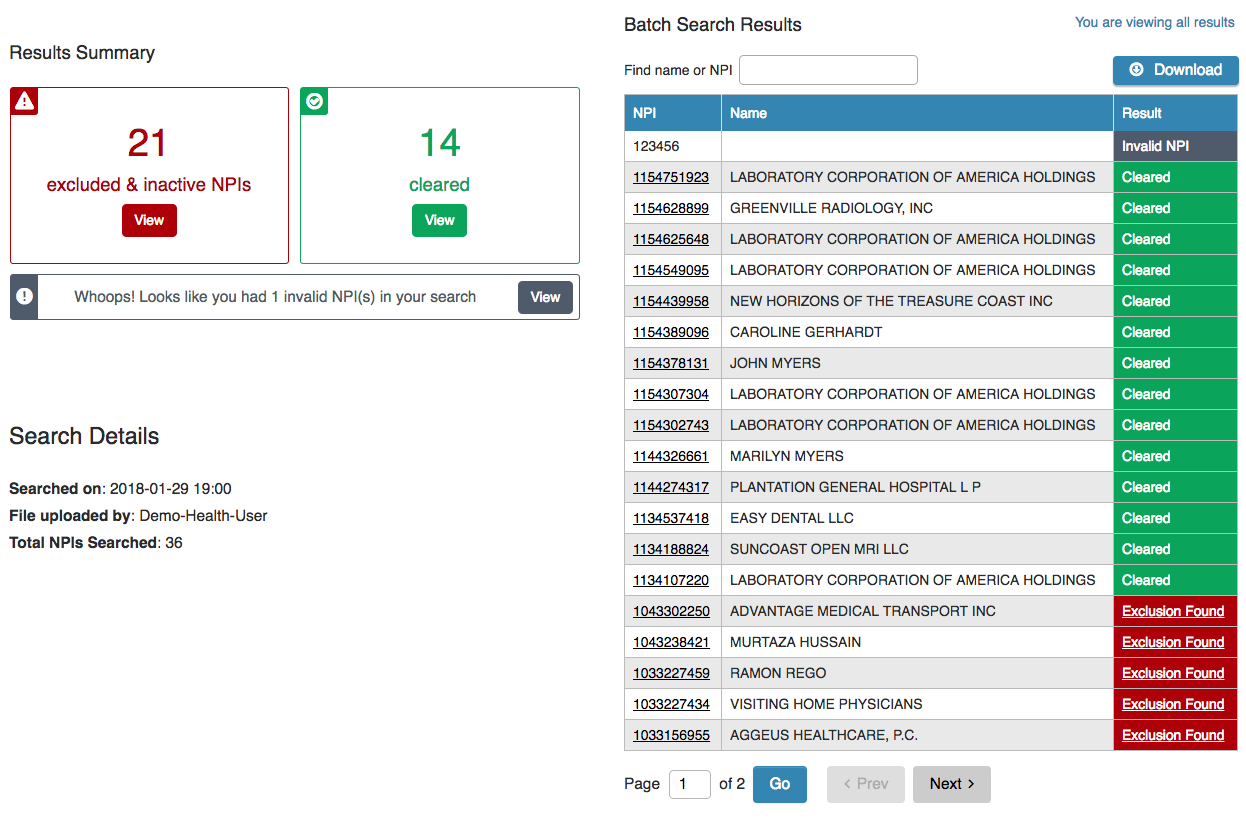
From this page you can either view the Exclusion tied to the NPI, view any NPPES provided information of the NPI (this will show the date an inactive NPI became inactive), or download an excel report with all NPIs searched and their result.
Comments
0 comments
Please sign in to leave a comment.