
Please note: ExclusionCheck Name and NPI Batch options have been replaced with New Batch Flexible Search. While you may continue using the older versions of NPI and Name Batch, they will not be receiving any further development. We encourage you to transition your existing batch searches to New Batch for an improved user experience. Visit our Help Center to learn more about our New Batch Search Functionality: How to Guide: New Batch Search
Once a batch has finished running you can review the results. On the batch row we'll display the number of records returned in a Non-Cleared or Under Review status. If you have OFAC searching we'll also display the number of OFAC records returned. (These will also be included in your overall records.) If you have SSNDMF searching on we'll display the number of SSNs searched that are a match to an SSN on the Death Master File.

Selecting a number will display the associated records for the batch and column selected. If reviewing "Non-Cleared", "Under Review" or "OFAC" you'll be taken to a page like the below.
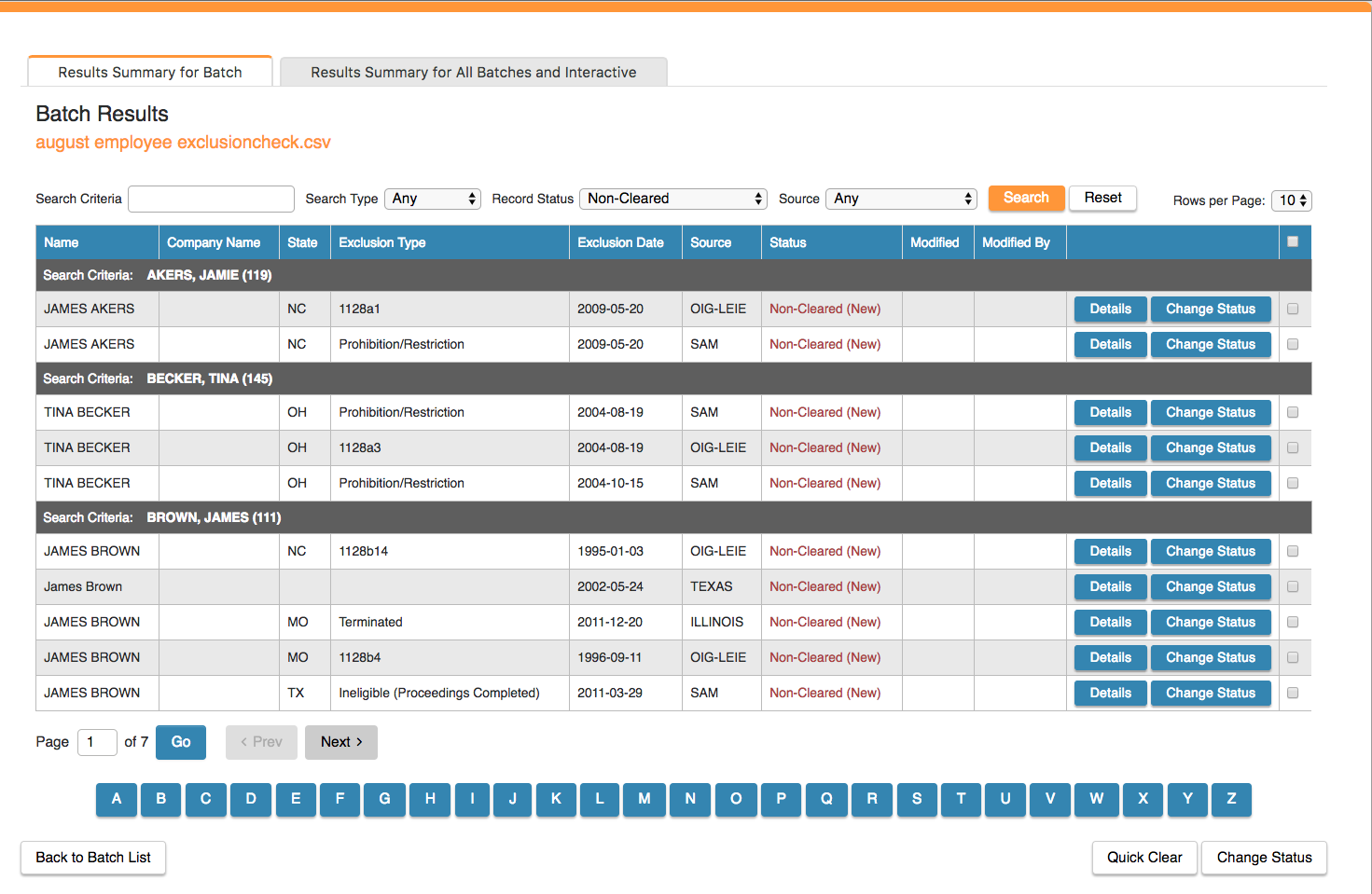
This page displays all records that were returned for the search criteria in a batch. At the top are filters that allow you to refine what's displayed on the table below by your Search Criteria, Search Type, Record Status or Excluding Source.
Selecting details will display all source provided information of the exclusion record and any correlated data you uploaded for that search criteria. From that page you can change the status and include any notes about the record.
There are a number of quick status change options available as well. Selecting change status on a row will allow you to add a note and change the status for that specific record. Selecting the checkbox on multiple rows will allow you to bulk change the statuses of them by either selecting "Quick Clear" or "Change Status" at the bottom of the page.
At the bottom of the page we provide an alphabetical paging option for working through really large files. Selecting a letter will display all records with a last name or company name starting with that letter.
Comments
0 comments
Please sign in to leave a comment.